01. You are at the right place! Be calm and don’t worry!
Welcome to “C90S Unleashed”!
You own one of the best systems in the world. Thanks to Asus in C90S we are delighted to use the amazing video adapter “NVidia 8600M (G84)” and that’s why this article exists. There are two treats for the C90S’s healthy – “NVidia 8600M (G84)” and the User!
If your system is still working my personal advice to you is to replace the world’s famous 8600M. In a case that C90S has problems the odds a cause for that to be 8600M is nearly 100%. When it’s failed you have two choices - to throw the C90S or to follow this article. The wise one is the first one and you have from me “Good luck and all the best!”
In another case you are not alone and this article is for you. We can and we’ll do it!
02. What will happen if I follow this article?
Tip: See Also section “NVidia Free C90S ( Results )”
Your system will be up and running and will not work only when is turned off. C90S will be better than it was thanks to your work and the magic of the knowledge. The things are not difficult to be implemented. Don’t be afraid, be calm and stay focused, open your mind, think, dream. Your imagination is one of the most powerful human qualities that brings to you ideas and makes miracles.
You have to choose between two video adapters at the moment (March 15, 2010) – “NVidia 9600M GT 512M DDR3” and “ATI Mobility Radeon HD 3650 512M DDR2”. If you are a gamer 9600M is for you. Until now there isn’t information about problems with 9600M. My personal choice is HD3650 and I’ll explain why in section “Video Adapter Replacement”. From mounting point of view the both video adapters are nearly identical. There are 2 differences which I’ll consider in the section “Mods/ Video Heatsink”.
Note: Check “Video Adapters for C90S/C90P” for the current list with all tested and working video cards on C90.
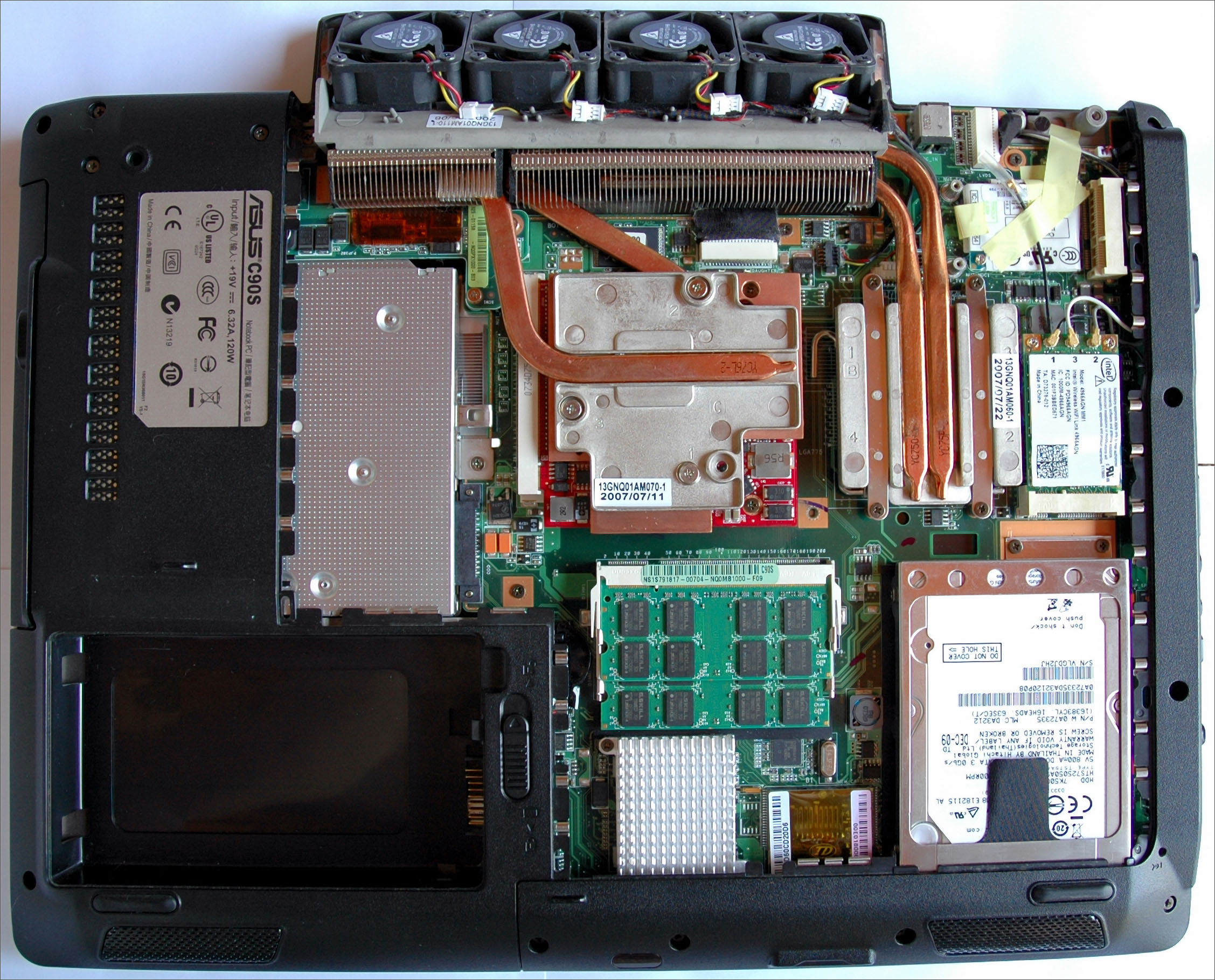
Video Heatsink “ASME” revision 1.0
Note #1: The real CPU temperatures are with 15 ºC higher (Pic. #2)! After the CPU upgrade the HWmonitor doesn’t sets the proper CPU’s TJMax and used the old one from X6800 that was 85 ºC. The fix is manually to set the proper TJMax at 100 ºC for Wolfdales CPUs in the HWmonitor’s configuration file “hwmonitorw.ini” (CPU_0_TJMAX=100.0).
Note #2: The HDD temp is 47 ºC because here is not implemented the “double diffuser” mod.Here you are a C90S’s pictures with applied 5 Base mods - Video Heatsink, North & South Bridge, CPU E7500 & BIOS 1002A and GPU & CPU information. These 5 mods set I’ll call “Base Mod”. The temperatures on the second picture are after running stress tests "Prime95 25.11" (CPU) and "ATITool 0.27 Beta 4" (GPU) for 72 hours each and an ambient temperature of 25 ºC.
Pic. #1: Video Heatsink “ASME” 1.0
Pic. #2: Temperatures (“ASME” rev. 1.0)
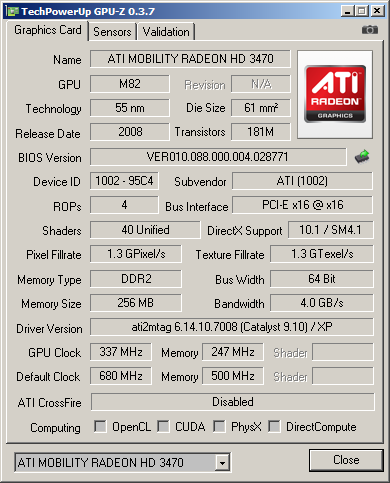
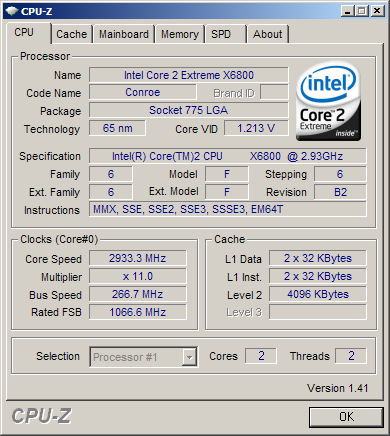
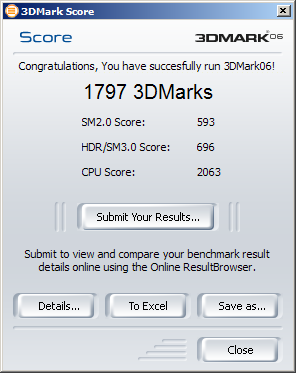
Pic. #3: GPU & CPU info and 3D Performance (“ASME” rev. 1.0)
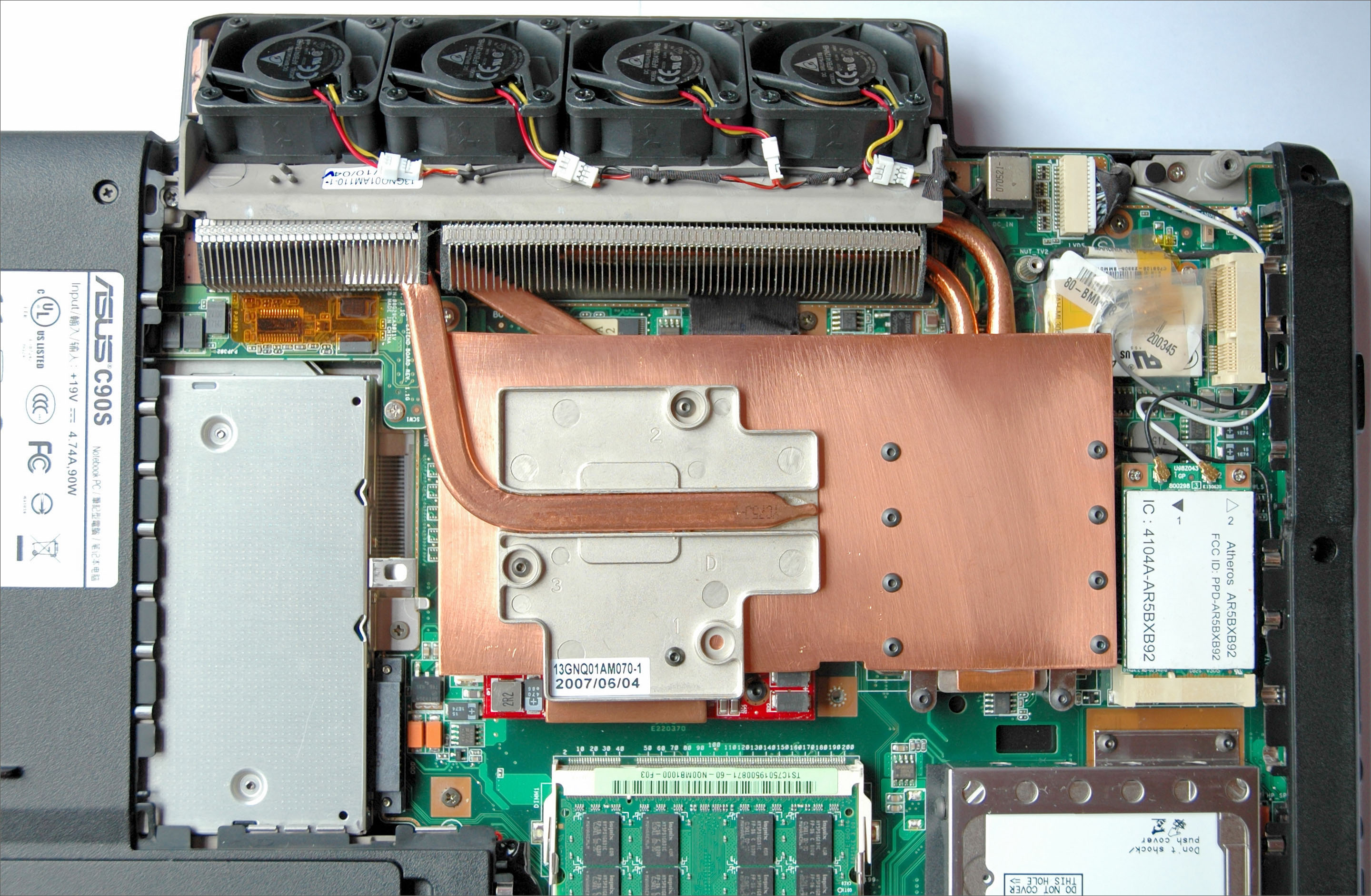
Video Heatsink “ASME” revision 4.0
Note: With a CPU E6600 and the “double diffuser” mod, Room Temperature ~ 25 ºC.
Pic. #4: Video Heatsink “ASME” 4.0
Pic. #5: Temperatures (“ASME” rev. 4.0)
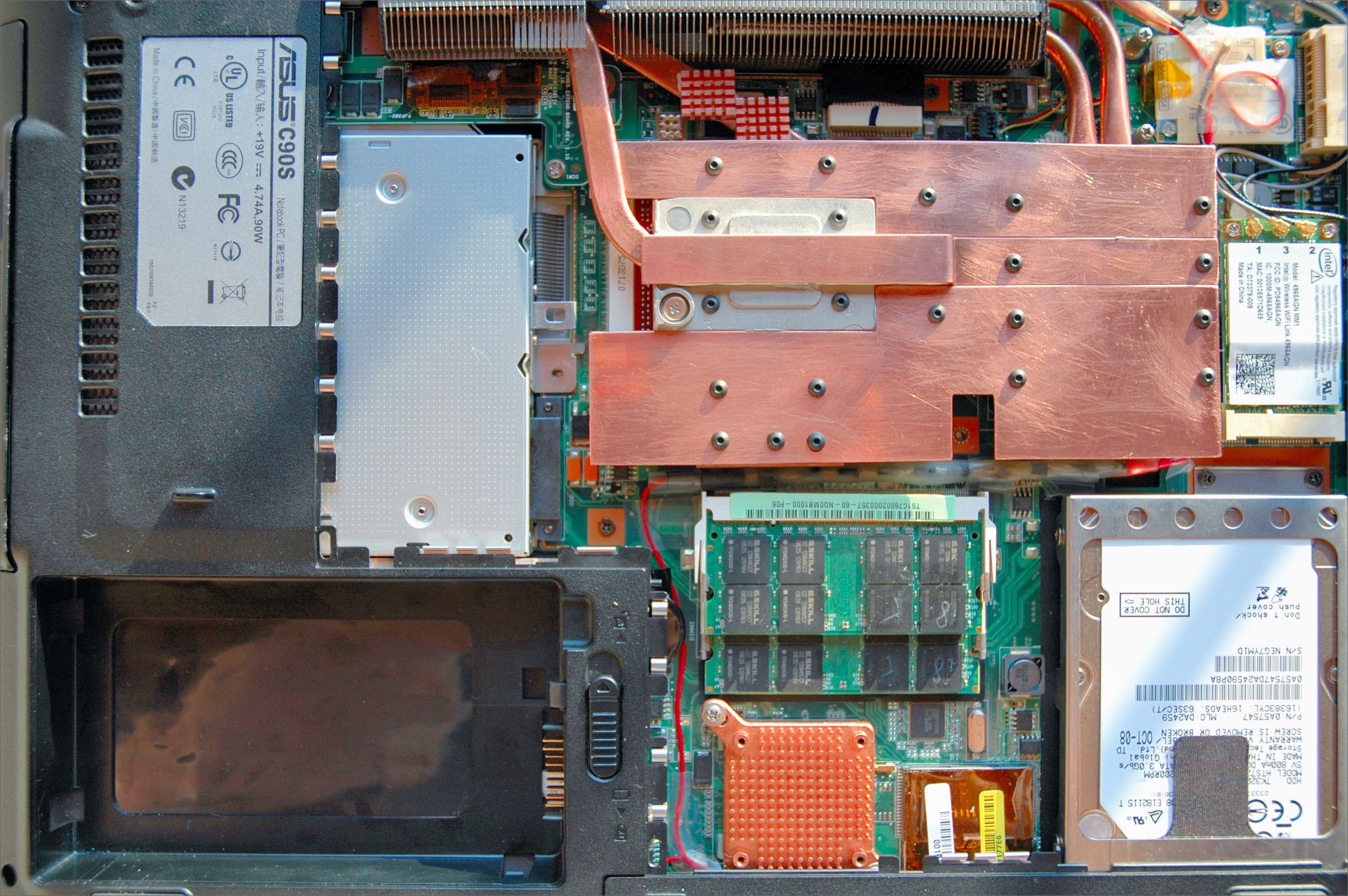
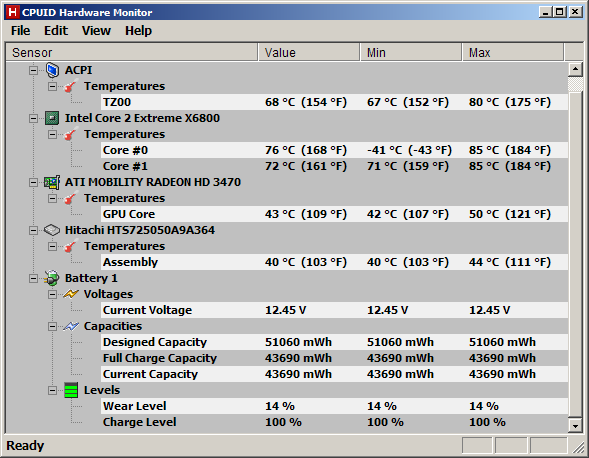
Video Heatsink “ASME Easy” revision 4.0
Note: With a CPU X6800, ATI Mobility HD3470 and the “double diffuser” mod, Room Temperature ~ 25 ºC.
Pic. #6: Video Heatsink “ASME Easy” 4.0
Pic. #7: Temperatures (“ASME Easy” rev. 4.0)
Pic. #8: The GPU
Pic. #9: The CPU
Pic. #10: 3D Performance
(“ASME Easy” rev. 4.0)



03. C90S and Asus Support Policy
From technical point of view C90S is unique and incredible laptop from 2007. In the time period October, 2007 – August, 2009 it works 24h per day without any freeze or restart nearly 2 years. C90S was one of the best reliable and stable systems for me. As an assembler Asus have all my respect and gratitude for C90S!
Asus is a correct business partner according to user’s agreement. No doubt about that!
I don’t like Asus support policy and I’m not an Asus supporter! C90S is my last Asus product.A rhetorical question: “What is that ‘Support of a product’?”
04. My System is Dead! Then What?
One day in August 2009 I was surprised with a BSOD. After turn off and turn on, the screen on the system was filled with strange lines during the POST and after that. Windows showed an error related to NVidia driver before to switch in graphics mode. On the next restart the screen was entirely white and no POST. My system was dead and useless.
The main suspect was NVidia. I was out of warranty and I found only one place in US with an 8600M in stock. Thanks to Marc from www.macrecycling.com my system was back again.
05. Where the Story Begins
During the time in my search for 8600M I found a lot of information about unusually highest rate failures of this video adapter. I was terrified and realized how reliable will be my system. In front of me was the choice – to make my C90S NVidia Free or to throw it. I took the decision to save my C90S thanks to NightWalker’s work “Asus C90S MXM graphics card upgrade tutorial” on his NightWalker's domain.Articles related to 8600M:
- All Nvidia G84 and G86s are bad / Charlie Demerjian
- Nvidia GPU failures caused by material problem / Wolfgang Gruener
Question: Is this equation is true?
Asus C90S + NVidia 8600M = TROUBLES
My Answer: Definitely YES. “Why?”
1) Asus - Bad Cooling Design
2) Nvidia - Bad Chips DesignThen we have the beauty:
Bad + Bad = C90S + Double Troubles
Let imagine the next:
Changed Thermal Design + ATI VGA = Quiet & Cool C90S
Is that is possible?
“Everything you can imagine is real.”, Picasso
I have no intention to argue with the artist.
06. Analysis & Agenda
“We can't solve problems by using the same kind of thinking we used when we created them.”
Albert EinsteinHere I recalled something! A rhetorical question: “Who is John Atanasoff?”
Every computer is a computer system consisting of many different components at different levels and layers connected each other. It’s essential to understand that definition when you have to deal with any software or hardware computer problem. Don’t forget the USER!
C90S is a low powered desktop put in the shape of a laptop, which is the source of thermal and power consumption problems. To deal with the thermal problem we need to understand the physical nature of processes (physics) and a little bit of mathematics to make some calculations and simulations.
The cooling design is based on dynamic air flow. It’s obvious why. From thermal point of view constant air flow is a better solution ("Why?"). Copper’s CPU & GPU heatsinks, better copper’s heatpipes are good decisions in right direction. Inappropriate use of heatpipes is one of the weaknesses in C90S thermal design.
We have to care for some important heat sources – CPU, GPU, South Bridge, North Bridge, HDD and DDR.
The die temperature of contemporary Video DDR chips is 105 ºC. ATI’s video adapters have GDDR chips from the both sides of their PCB. Something very important is that GDDR temperature is considerably lower than GPU temperature. That’s why there is no need to cool with a heatsink GDDR chips from the back side of a VGA.
Remove and threw out any thermal tapes, pads, compounds from the laptop! Many manufactures are using thermal tapes or pads because it’s a chip solution. Most of the used stock thermal compounds are with a very low quality. For the best thermal conductivity always use a quality thermal compound. For laptops it’s essential. At the moment the best compound is Noctua NT-H1. Some compounds are dangerous if you are not careful (e.g. Arctic Silver 5 – slight electrical conductivity).
Lower the temp to extend the system’s life and to maintain higher performance. Keep the temp under 50 ºC. Upgrade all bad components.
A rhetorical question: “What’s Graphene?”The problem with the lost wireless network connection on battery is caused from a software conflict between Intel’s Driver & Application and the OS. In Windows the solution is named Atheros AR9280. It’s little boring never to lose a connection and always having 300MBits/s to any 801.11n router.
PSU is one of the most important parts from our equipment. Let use the better one - Toshiba 120-Watt Global AC Adapter PA3717U-1ACA. I’m using also Toshiba 75-Watt Global AC Adapter PA3468U-1ACA (Yes, 75W!). One of the reasons for Toshiba’s PSU is if you have professional audio equipment. Audio engineers and musicians know what I’m talking about.
Let’s make C90’s cooling in that way that to hear the sound of ours SSD Drives.
A rhetorical question: “Is there a connection between C90S and the zebra?”Let see what we have to do. Here you are the agenda (Base Mods):
- Upgrade VGA MXM II
- Build & Mount a Copper Heatsink “ASME” (the BEST in the world, ETA: 6 hours)
- Use Thermal Adhesive “Arctic Alumina Premium Ceramic Thermal Adhesive”
- Use Thermal Compound “Noctua NT-H1”, “IC Diamond”, “Shin Etsu X23-7783D” or a better one
- Upgrade VGA Drivers
- Upgrade South Bridge Heatsink with a Copper one “Enzotech SLF-1”
- Add Copper Heatsinks over North Bridge Copper’s Pipe
- Update BIOS version to the last BIOS 1002A (BIOS 1002A = BIOS 1002 + E7500 Support)
- Upgrade CPU with Intel E7500
- Upgrade WiFi with “Atheros AR9280” (802.11n/a/b/g 300 Mbps, 2Tx2R MIMO)
- Upgrade WiFi Driver
- Upgrade RAM memory with “G.SKILL Model F2-6400CL5D-4GBSQ” or better
- Upgrade PSU with “Toshiba 120-Watt Global AC Adapter PA3717U-1ACA” or better
Warning! If you do that your system will work in the next 5 years without a warranty. Oh, that's a shame! But there is another problem with C90S – the GPU temperature will drop with ~20 ºC and your system will whisper to you.